Klevu "Preserve Layout" for Shopify allows your customers to experience
the power of Klevu AI and merchandising, presented to your customers
using your own Shopify theme.
How does it work?
Klevu regularly monitors your Shopify product catalog, Visual Merchandising
rules, customer clicks and purchases. We automatically detect when products
within a particular Collection should be reordered, then we update the
ordering of products within each of your Collections via the Shopify
API.
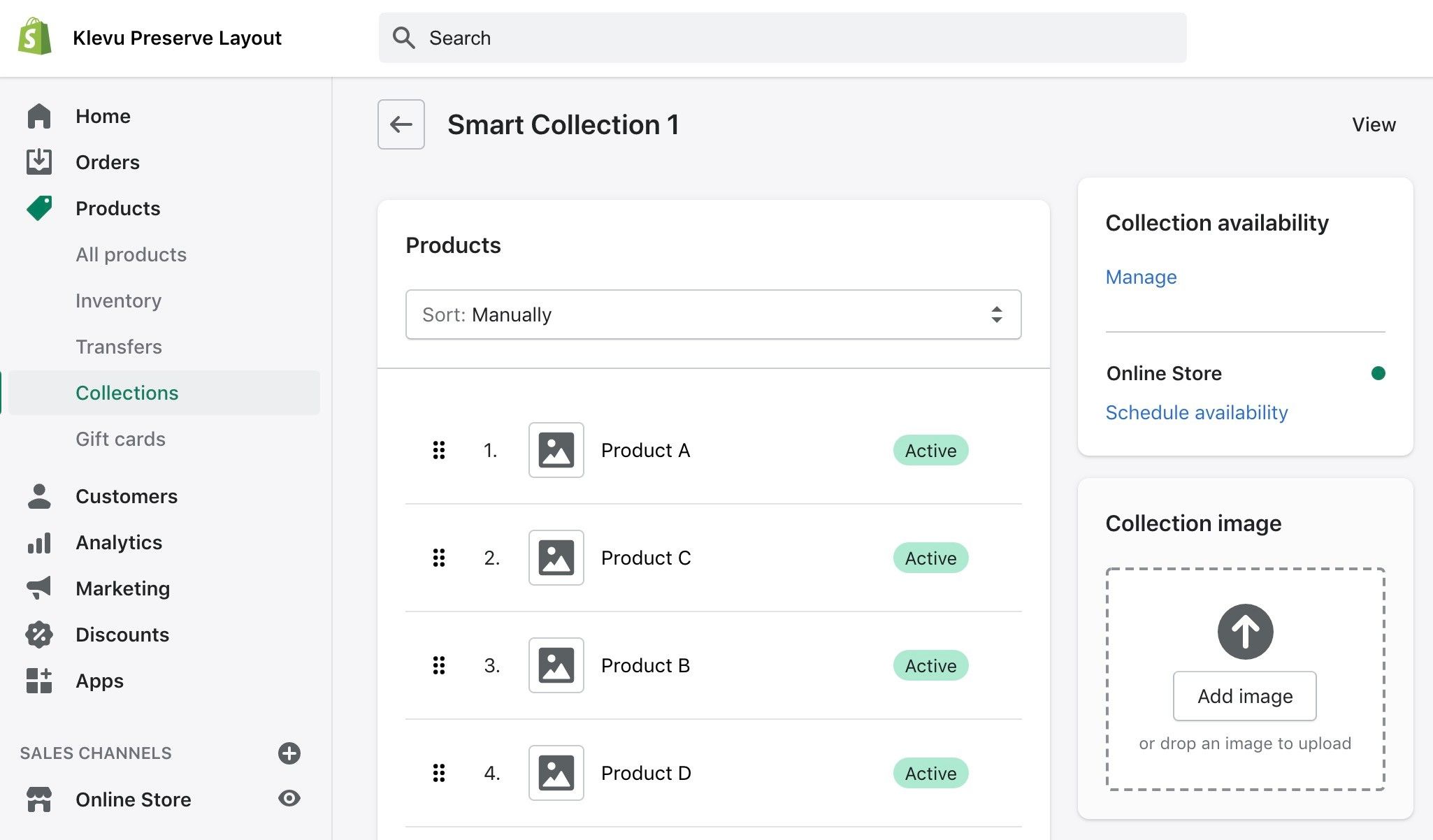
You will see this change reflected within your Shopify admin panel, in
the below screen:
How these products are presented to your customers and what other visual
effects you would like to display are entirely at your disposal using
Shopify’s native theme engine, or your own PWA or headless theme.
Since Klevu integrates with Shopify at this core data level, any functionality
such as third-party Apps, integrations or custom frontend storefronts
that consume this native product ordering will all benefit from the Klevu
AI and merchandising suite.
How do I try it?
The first step is to install the
Klevu App
from the Shopify App Store and integrate an active Klevu account with
a subscription to Smart Category Merchandising.
Once you have integrated, please
contact our support team
to guide you through implementing Preserve Shopify Theme layout on your
store.
Since January 9th, 2024, Shopify Preserve Layout is no longer supported
natively by the Klevu App. Once Klevu support has enabled the Preserve
Layout service, you will need to manually integrate tracking scripts
into your theme by following the relevant
integration guide here.
Select the appropriate guide and consult the
Smart Category Merchandising - Preserve Shopify Theme
section.
Before starting this process, you should ensure that you are comfortable
with the following caveats:
-
Preserve Shopify Theme is only available to Collection pages - search
result landing pages cannot use this layout option
-
Some features, including personalisation and product exclusions,
are not supported
-
Every collection in your installation will be affected - Preserve
Shopify Theme cannot be enabled selectively on only certain categories
-
The action of changing your collections' sort orders is destructive
- once they have been modified by Klevu, they cannot automatically
be reverted to their previous state.
-
When the Preserve Shopify Theme service is enabled, Klevu adjusts
the Shopify collections sorting order to "Manual" to facilitate the
functionality of Klevu sorting.
-
Preserve Shopify Theme cannot be tested on unpublished themes
Frequently Asked Questions
The following are the most frequently asked questions. Please familiarise
yourself with these topics before enabling Klevu Preserve Layout on your
Shopify store.
Should I take a backup of my Shopify theme / store data?
Yes. When you enable Preserve Layout, we will attempt to modify certain
elements of your theme to ensure Klevu will continue to work as expected.
For this reason,
we recommend taking a backup before enabling this option.
Furthermore, once you enable Klevu Preserve Layout for Shopify,
Klevu will overwrite the ordering of products within your collections.
If you wish to retain this manual order you have specified,
please take your own precautions to backup your data
before you proceed with Klevu Preserve Layout.
Exactly what changes will be made when this option is enabled?
When this option is enabled, Klevu will immediately modify certain
templates of your live theme. This is to ensure the required analytics
calls are sent to Klevu at the appropriate times. Details of these
modifications can be found within the
Manual Installation instructions
Klevu will then begin a process that will
regularly modify
the order of the products within your Collections. Klevu will
NOT add new products
to a Collection, and
Klevu will
NOT remove existing products
from a Collection. Only the ordering of products within a Collection
will be modified.
Klevu needs to make certain modifications to your active theme
for this option to work correctly. To understand these changes
in full, please review the manual installation instructions which
details the steps which are automated by the Klevu App.
Can I change the sort order label Featured to something else?
Yes. This involves a code modification and can vary from theme to
theme, so please liaise with your frontend developer for this. We
have provided one such example below for your reference.
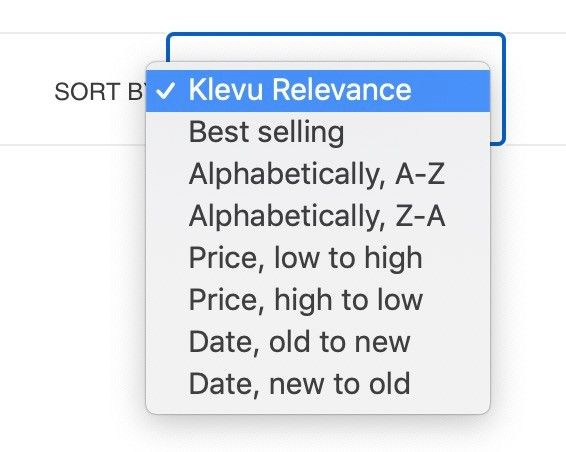
In some Shopify themes you will find collection-template.liquid
which contains a section of code to display your sort-order dropdown.
You can modify this to include a custom label for your Manual
/ Featured ordering:
 {%- for option in collection.sort_options -%}
{%- assign custom_sort_label = option.name %}
{% if option.value == 'manual' %}
{%- assign custom_sort_label = "Klevu Relevance" %}
{% endif %}


{{ custom_sort_label }}


{%- endfor -%}
Which of my collections will be impacted?
Klevu will change the sort order of ALL of your Shopify collections.
If you wish to retain this manual order you have specified,
please take your own precautions to backup your data
before you proceed with Klevu Preserve Layout.
What will happen to my manually merchandised collections?
Once you enable Klevu Preserve Layout for Shopify, Klevu will overwrite
the ordering of products within your collections. If you wish to
retain this manual order you have specified,
please take your own precautions to backup your data
before you proceed with Klevu Preserve Layout.
How many Products per Collection do you support?
We currently only merchandise the first 2,000 products in each Collection.
You can still use Klevu Preserve Layout with collections containing
more products than this, however the ordering of the remaining products
outside of the first 2,000 will not be controlled by Klevu.
Why is my new product appearing in an unexpected position?
If you have recently added a product to a collection, first please
wait for this product to become synced with Klevu. Once you can see
it in the Klevu Visual Merchandiser, you can use the tools to promote
that product as you wish. Until this point, the product will still
appear on your frontend, but its position will be whichever position
was assigned to it by Shopify.
Why is my new collection's product sorting not changing?
If you have recently added a new collection, first please wait for
this collection to become synced with Klevu. Once you can see it
in the Klevu Visual Merchandiser, you can use the tools to promote
the products as you wish. Until this point, the collection will still
appear on your frontend, but the position of its products will be
those assigned by Shopify.
The Product order in Klevu Visual Merchandiser is different to Shopify
If changes you see in Klevu VM are not appearing the same as in your
Shopify frontend, please ensure you have waited at least 15 minutes
for the changes to appear, as the process can take this long in certain
circumstances.
If the changes are still not reflected after 15 minutes, please
use the manual sync button, which is found in the same place
you enabled Shopify PL via Apps > Klevu > Settings, to
trigger an update.
If you still find differences in your product data, please contact
Klevu Support
who will look into this further.
Why does Klevu Visual Merchandiser show a different variant image to Shopify?
We do not currently support displaying the same variant in the Shopify
theme as you see in Klevu Visual Merchandiser. The parent product
itself will match, but the variant displayed may differ. This is
because the association of a product to a collection is done at the
parent level in Shopify. The product imagery and details you see
are determined by your Shopify theme.
Why are excluded products in Klevu Visual Merchandiser still appearing?
Exclusion of products via Visual Merchandising is not supported with
Shopify Preserve Layout. If you wish to exclude a product from a
collection, please remove the association via the Shopify admin panel.
Does Klevu support Collections with the same name?
No. Klevu uses the Collection name as a unique identifier. If two
Collections have exactly the same name, for example "Shoes", Klevu
CatNav will only support one of them and you will see unexpected
results. Please ensure all of your Collection names are unique.
How do I ensure Klevu Analytics works correctly with Preserve Layout?
A major part of the Klevu integration is feedback on your customers'
interactions with products. Analytics requests to capture product
clicks and views must therefore be integrated with your theme. The
Klevu App attempts to include this integration when you enable Preserve
Layout, but depending on your theme sometimes this is not possible.
What is the Collection Sort Order Sync button?
Klevu regularly monitors for changes in your catalog and will update
the Shopify Collections automatically. However, if you find that
some changes you have made in Klevu Visual Merchandiser have not
been reflected after 10-15 minutes, you can use this button to force
a sync of your Collections.
Please use this with caution
as it will sync the product ordering within all of your Collections
and can use up some of your API rate limit, which might delay
other aspects of the integration such as the overall data sync.
I use Apps on Collection pages, will they still work?
Yes. Klevu Preserve Layout directly modifies the Manual Sort Order
of each Collection. The rendering of the Collection page itself still
utilises the native Shopify workflow. Therefore, if you have an Apps
such as for filtering or facets, it will continue to work with Klevu
Preserve Layout.
How will this impact my third-party apps or integrations?
Klevu Preserve Layout directly modifies the Manual Sort Order of
each Collection. Therefore, if you have any Apps or integrations
which are using the Shopify API to retrieve the order of products
within a Collection, they will also benefit from the results of Klevu
AI and merchandising.
Will this approach work with PWA or Headless themes?
Klevu Preserve Layout directly modifies the Manual Sort Order of
each Collection. Therefore, if you have any custom website frontend
which is using the Shopify API to retrieve the order of products
within a Collection, it will automatically display the products to
your customers utilising Klevu AI and merchandising.
What if I (or another App) manually changes the order of products?
As a rule we recommend you do not manually modify the sort order
in Shopify. Instead please utilise the Klevu Visual Merchandising
tool for manual merchandising.
However, if you do modify the order of products within a particular
Collection, the updated ordering will apply on your website frontend
until the next time Klevu determines the ordering needs to change
in that Collection, at which point your manual changes will be
overwritten.
Furthermore, if you change the default sort-order of a Collection
to something other than Manual, for example Price or Alphabetical,
this will prevent Klevu from being able to update the ordering
of your store.
How can I use Personalisation with Preserve Layout?
Klevu Preserve Layout directly modifies the Manual Sort Order of
each Collection, and unfortunately, Shopify does not provide a mechanism
to do this on a customer-by-customer basis. Therefore, all visitors
will see the same product ordering on your Collection pages.
